Simpler checks.
Better execution.
Chexlist turns any web page into a checklist. Point at the settings that matter, save them once, and Chexlist finds and highlights them again — right on the page, every time your team works it.
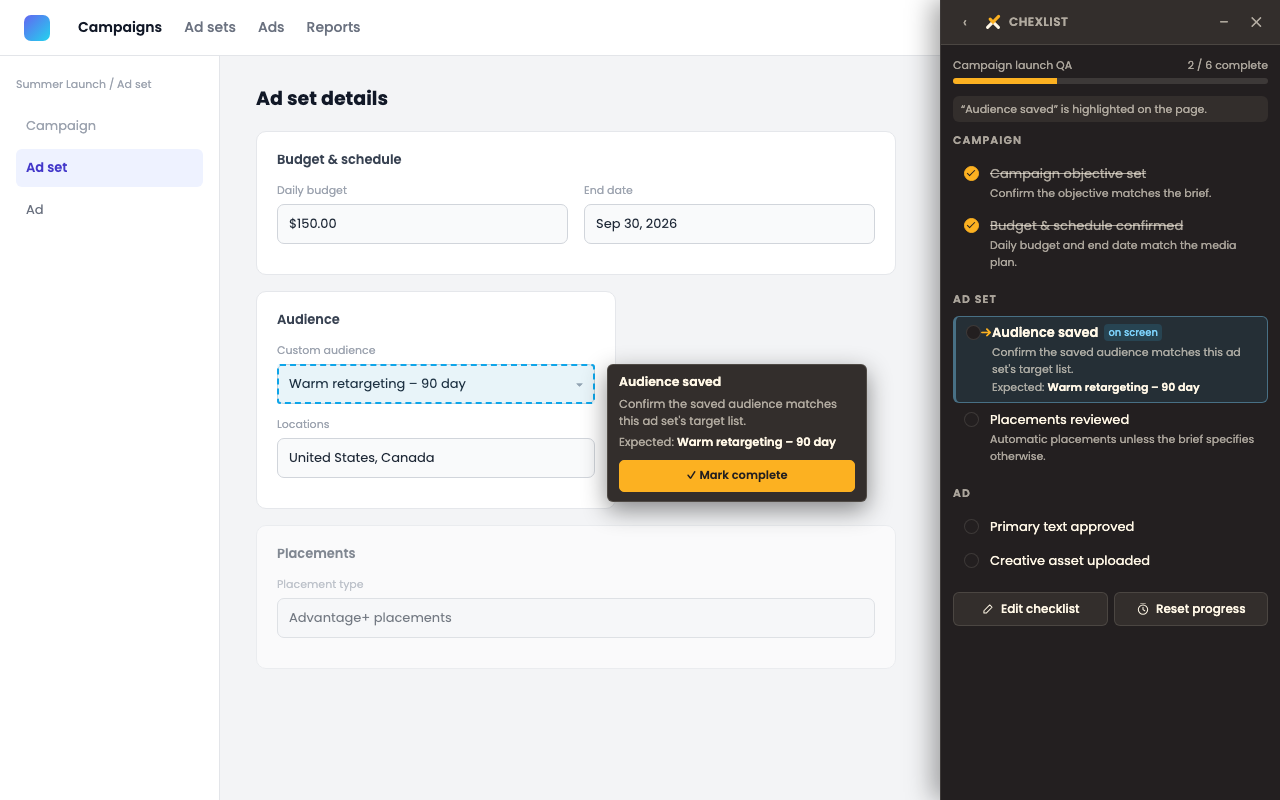
The checklist panel opens beside the page you're working in. The next item is marked and highlighted automatically as it comes into view — nothing on the page is touched.
Four steps, right on the page
No separate app, no setup. Chexlist runs alongside the site you're already in.
Select
Click "Create checklist," then click the controls that matter on the page. Each one gets a name and a selector reliability grade.
Save
Add an instruction or an expected value where it helps, then save the checklist to that page.
Run
Open it any time — even in a different session. Chexlist highlights the next item automatically as it comes on screen.
Complete
Check it off from the panel or right from the page. Chexlist only ever points — it never clicks or changes anything for you.
The tools aren't the problem
Teams already know how to use the tools they work in. What gets missed are the small but important checks — a setting nobody double-checked, an audience nobody re-confirmed before launch.
Chexlist turns those checks into a repeatable workflow that lives on the page itself, and grades how reliable each saved item is, so you know which ones will still find their target next time the page changes.
Marketing campaign setup
Chexlist's first practical use case is campaign setup and QA — the settings that are easy to miss when you're moving fast through a platform like Meta Ads Manager. Build a checklist once for the screens your team touches, and every teammate who opens it afterward gets guided to the same controls, in the same order.
Nothing about Chexlist is tied to Meta specifically — it works on any http or https page, so the same approach carries over to whatever web app your team checks next.